

Troubleshooting Guide
Internet Not Working? Start Here:
Step 1: Restart Your Router:
Unplug both your router and the power adapter (the small box) for 5 minutes.
Plug them back in and wait for everything to restart.
Allow 1-2 minutes for the connection to return.
Step 2: Check Your Wi-Fi Network
Try connecting a device to your correct Wi-Fi network
Did the network name change? If so, your router might have reset itself.
Move closer to the router
Try connecting with another device
Step 3: Run A Speed Test
If your network name stayed the same, bypass the router by connecting an ethernet cable directly to your computer.
Run a speed test at https://www.speedtest.net/ to see your download and upload speeds.
Still Not working?
Your modem (ONT) may be the issue. Follow the steps below to check your connection.
Check Your Modem (ONT)
Your modem connects your home to our fiber network. If the lights are not correct, your internet may not work.
Option 1 Calix Modem:
Check Calix Modem
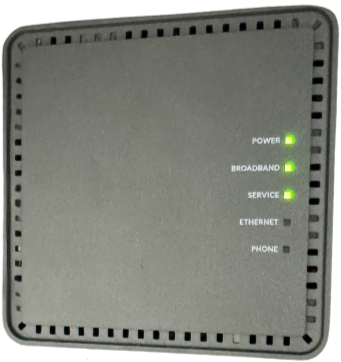
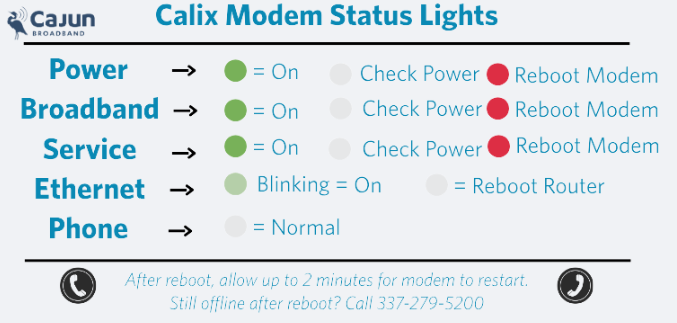
Check Lights:
Power, Broadband, Service - ON
Ethernet - ON or Blinking
If not, Reboot Modem:
Unplug modem
Wait 30 seconds
Plug back in
Wait 2-3 minutes
Option 2 Adtran Modem:
Check Adtran Modem
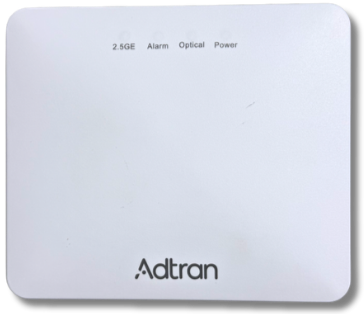
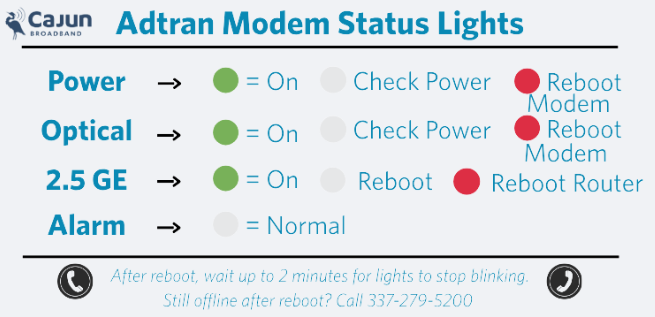
Check Lights:
Power, Optical - ON
Alarm - OFF
2.5 GE- ON or Blinking
If not, Reboot Modem:
Unplug modem
Wait 30 seconds
Plug back in
Wait 2-3 minutes
Still having issues?
Modem lights are red or off
Internet is not returning
Contact the Cajun Broadband Team
337-279-5200
If you call after 4 PM Monday-Friday, leave a message with our answering service. Our technician will return your call.